The SQM was delivered with logging software, “SQM Manager”, but for Win XP 32 bit. NIST is not allowed to use XP operating system computers. We are allowed to keep a few to run obsolete equipment but we cannot connect to the internet or get the machines repaired. I have two – one with a bad screen and the other that still works. SQM Manager as delivered would not operate on my XP machine. After some weeks of contacting Yankee Environmental Systems (YES), they sent us an updated piece of software and this allowed us to run SQM Manager on the XP machine. Issues noted were that the graphics windows did not autoscale, the buttons functionality is not self-evident, and there is an extra column of data in the file that is not described in the manual. It appears to be a temperature.
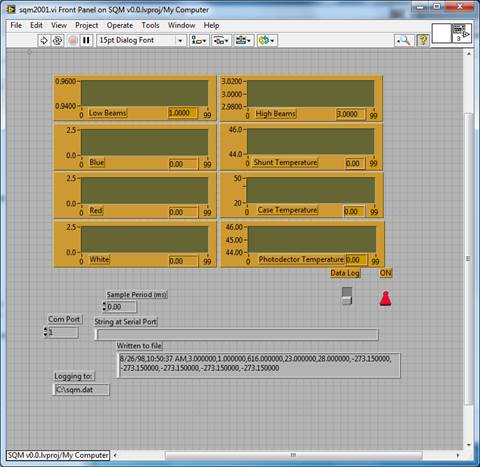
We asked YES for the original Labview code. After some time, they sent us the software but noted they could no longer open it because it is in an old version of Labview. Tom Larason took these elements (sqm2001.vi, sqm2001.llb, xsample.llb, parse_sqm.vi, SQM – 100 control.llb, and SQM Control Win 95.llb) and updated the 2001 versions to Labview 2013 (not all would update). Fig. 1 is a screen shot of how the YES program looks in Labview 2013. He had to rewrite the “Parse” vi and he redid the serial VISA. It will run the SQM. We note that a header row is now saved in the data file, but otherwise Tom kept the formatting the same as YES: except for between the time and the first SQM data field, all fields are separated by a blank and a comma, including at the end of the line (we will change this for the NET version). A call is made to the SQM – with one command – and then this string is parsed to get the SQM fields. This does not include date or time – this information is added by Labview to the front of the data stream. An example of the YES SQM on the XP machine data file is attached.
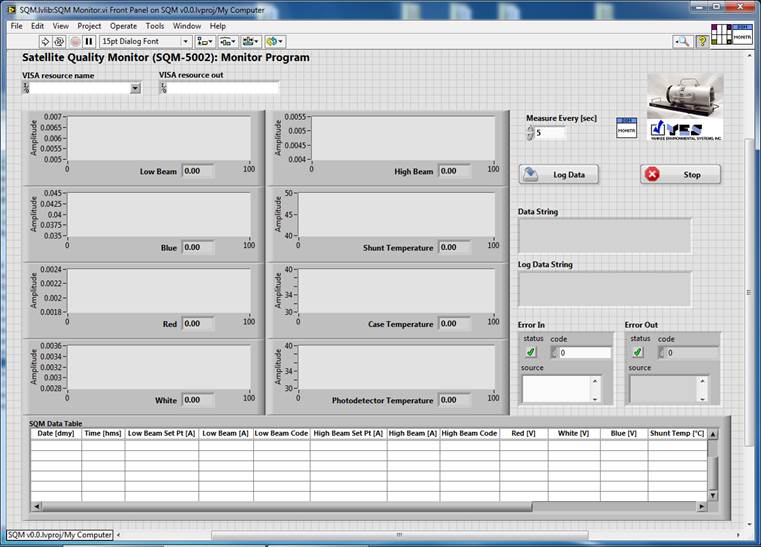
Tom has reworked the SQM logging program. For now, he kept the data file format exactly. He added a table to the front panel to show the data, and is anticipating additional commands related to set up etc. This leads to Problem 2 – what do we want this program to look like and how to function? NOTE: The SQM has no on/off switch; when plugged into to AC the electronics are on and you can log data – even with the knob in the “OFF” position. So we plugged it into a power strip and use that for the on/off switch. With AC on, and the SQM switch is moved to “STANDBY”, the temperature controllers come on. The lamps come on when you switch to Hi, Med, or Lo. So, the software must be designed with this in mind, so the metadata is correct as to who did what when.
A next step is Log Sheets, stay tuned. The data stream will be what it is now, but we have freedom on the metadata and operating protocols.
Fig. 1 Screen shot of sqm2001.vi (LabVIEW 5.1 version converted to LabVIEW 2013).
Fig. 2 Screen shot of updated SQM Monitor.vi version 0.0 (LabVIEW 2013).
The SQM logs these variables:
Date and time;
1A set current
1A actual current
1A diagnostic code (we don’t care about this)
3A set current
3A actual current
3A diagnostic code (we don’t care about this)
Photodiode 1 voltage
Photodiode 2 voltage
Photodiode 3 voltage
Temperature 1
Temperature 2
Temperature 3
Temperature 4
The photodiodes are “blue” “red” and “broadband” but looking at the data so far I think the manual has them mislabeled so I’d just number them for now. The manual mentions 3, not 4 temperatures so for now we’ll call them 1 to 4 since we are not sure what part of the SQM they are attached to.
Traditionally, the log sheet would be geared to the radiometer measuring the SQM. The SQM is a source, and the source part was in the “header” part of the log sheets. So we need to think about how to record the manual steps related to the SQM described below. I think we’d have a MOBY SQM log sheet and a CAS SQM log sheet to account for the differences in the MOBY and the CAS?
The log sheet would could have a place to note (occasionally?) the actual SQM currents, photodiodes, and temperatures. The set currents cannot be changed so that can be hardwired onto the form.
The log sheet would have SQM and MOBY/CAS filenames – and we need a convention how about SQM_YYYYMMDD_xxx.txt? (NOTE we plan on the same file format as the Version 2 NPR file).
Now, the big SQM issue I see is the manual steps, and also what happens when you change output light levels. Here is a typical sequence: